iPadian 0.1
Screenshots of iPadian


iPadian Editor's Review
Since the dawn of the PC, emulating has been always considered a useful process, that has its own advantages in terms of portability on different systems. Most relevant examples would be the Amiga and Commodore 8 bit apps that have been emulated to run on newer 16 bit systems. Even console games from Nintendo, Sega, and Atari have been emulated to run on a computer with Windows operating system. But what about running iPad apps on your desktop?
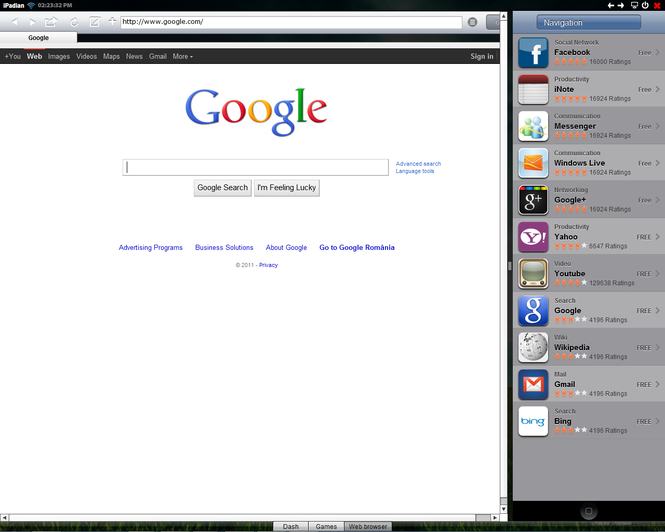
The only solution at the moment is iPadian, a free Adobe AIR open source app that can emulate the iPad environment and gives you access to some iPad native apps. iPadian needs no installation process, just extract the archive wherever you want and run it (it requires Adobe AIR to be installed). You will get an overlay iPad desktop with access to some native apps: iNote, iChat, Instagram, Keynote, etc.
Despite the full screen view you will not lose contact with your original desktop. The taskbar can be accessed at anytime. There is also a huge offer to online services, from the popular Facebook social network and YouTube to epubBooks, Google and Bing. If you own accounts from any of these services, iPadian can log you in automatically in case you are already logged through your computer, keeping you up to date with all the activity.
Being an open source program, iPadian has no access to the native Apps Store service. The so-called store is just an easier way to get to online free apps that are similar to the popular present in the original tablet. For example the Games icon is just a link to the Scumlabs online games service and the Radio icon sends you directly to The Radio.com service.
Unfortunately iPadian features no touch-screen support nor mouse gestures. At the moment you are restricted to interact with its interface by point-and-click with the mouse. Despite its drawbacks, iPadian is worth a look, especially because of its unique nature of bringing a sense of iPad into our desktops.
Pluses: open source, it can log you in automatically on any social network if you have logged in earlier through your computer, access to many free online services;
Drawbacks/flaws: no touch-screen or mouse gestures support, no official AppsStore available, requires Adobe AIR to be installed, crashes a lot;
In conclusion: iPadian is an original open-source project that wants to bring the iPad philosophy into your computer without the need of buying the actual tablet.
iPadian Publisher's Description
What's New in Version 0.1 of iPadian
- Full Screen preview
- Custom App Store
- Games
- Free music & videos
- Webkit browser
- Support Facebook notification & messages
- Social Chat
Other Languages
Look for Similar Items by Category
Feedback
- If you need help or have a question, contact us
- Would you like to update this product info?
- Is there any feedback you would like to provide? Click here
Popular Downloads
-
 KaraFun Karaoke Player
2.6.2.0
KaraFun Karaoke Player
2.6.2.0
-
 Kundli
4.5
Kundli
4.5
-
 Macromedia Flash 8
8.0
Macromedia Flash 8
8.0
- FastSum 1.9
-
 FastSum Standard Edition
1.6
FastSum Standard Edition
1.6
-
 Cool Edit Pro
2.1.3097.0
Cool Edit Pro
2.1.3097.0
-
 Cheat Engine
6.8.1
Cheat Engine
6.8.1
-
 Hill Climb Racing
1.0
Hill Climb Racing
1.0
-
 GeoGebra
5.0.44
GeoGebra
5.0.44
-
 My Talking Tom
1.0
My Talking Tom
1.0
-
 Tom VPN
2.2.8
Tom VPN
2.2.8
-
 Windows XP Service Pack 3
Build...
Windows XP Service Pack 3
Build...
-
 C-Free
5.0
C-Free
5.0
-
 Facebook Messenger
440.9.118.0
Facebook Messenger
440.9.118.0
-
 Vector on PC
1.0
Vector on PC
1.0
-
 Vidnoz AI
1.0.0
Vidnoz AI
1.0.0
-
 Netcut
2.1.4
Netcut
2.1.4
- Jingle Keyboard 2.4
- Video Guardian XP 3.0
-
 Auto-Tune Evo VST
6.0.9.2
Auto-Tune Evo VST
6.0.9.2